AI chat gets much more useful the moment it stops explaining software and starts opening software.
That was the real question behind this build. I wanted ChatGPT or Claude to answer a normal invoice question by opening the invoice view inside the conversation, not by producing another tidy paragraph about invoices.
I tested that in Fakturacia, the invoicing tool I keep building for myself. It started as a practical side project because I got tired of paying nearly 10 € a month to bloated invoicing software just to export a few PDFs. I still use it, I still test new tooling in it, and I still want to get e-invoicing into it before the end of this year, since the legislation requires it by 2027.
The image below shows the whole point more clearly than a long explanation. A user asks a normal product question in chat, that request goes through the MCP tool layer into the app, auth is handled properly, and the result is a real invoice overview UI rendered inside the conversation.
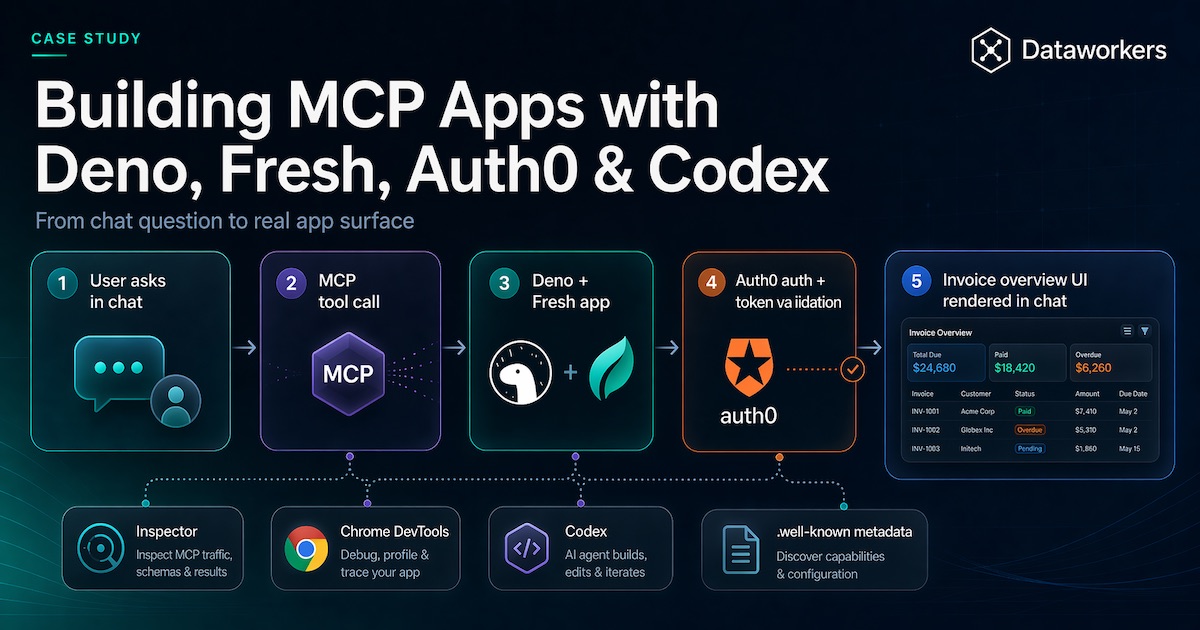
That is the clean version. The screenshot below is the part that made the whole experiment feel real: the actual invoice overview rendering inside the chat after the MCP App call completed.
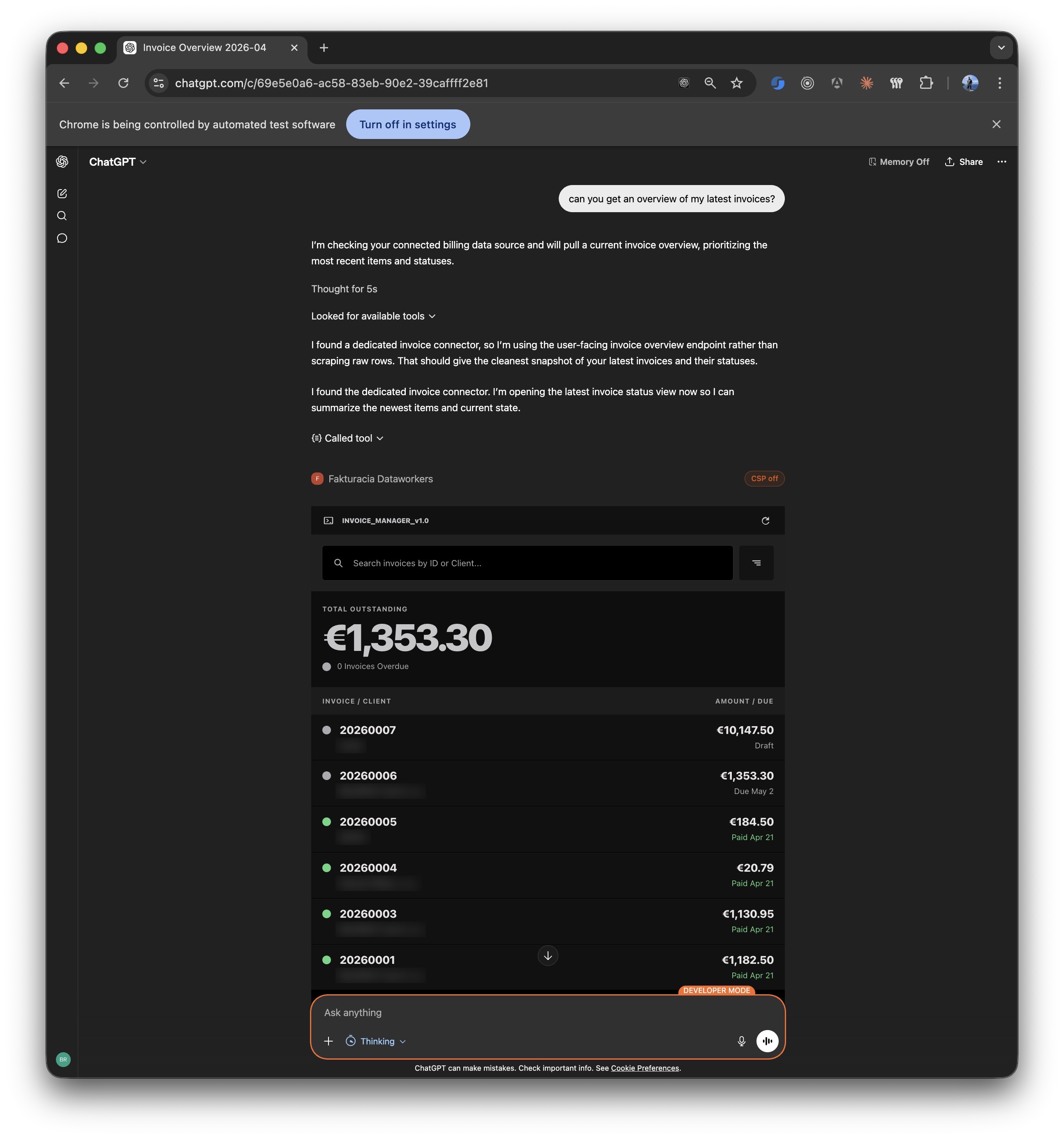
That is what kept me interested in MCP Apps. The protocol details matter, and the rest of this article gets into them, but the useful shift is simpler than the acronym: a user asks for something normal and gets dropped into a usable part of the product instead of a wall of text.
Start with the docs, then put the server on remote HTTP
If you are building MCP Apps right now, start with the official docs. I do not mean that as a polite nod to the source material. I mean it literally. AI tooling is changing too quickly for second-hand summaries to stay trustworthy for long. I kept Build a server, Build with Agent Skills, Build MCP Apps, and Inspector open the whole time because those pages are where the current rules actually live.
This is also where skills and plugins become genuinely useful. Good skills stop coding agents from falling back to whatever generic defaults are floating around in the model. For Deno work, the Deno skills repository is a very good example. More broadly, skills.sh is already useful for seeing how people package framework knowledge into something tooling can actually reuse. That mattered here. Without those constraints, the model kept trying to smooth over exactly the details that MCP clients care about.
From the start I wanted this on remote HTTP inside the existing Fresh app because it was the quickest way to test the whole thing without inventing another server or API just for the MVP. It is easy enough to split it into a dedicated service later. For the first version, I cared more about getting the full loop working quickly, while keeping the implementation clean enough that separation would not be painful later. Once real authentication and browser-hosted clients enter the picture, the server still has to behave like a real product surface, so transport, metadata, CORS, auth, and deployment all have to line up.
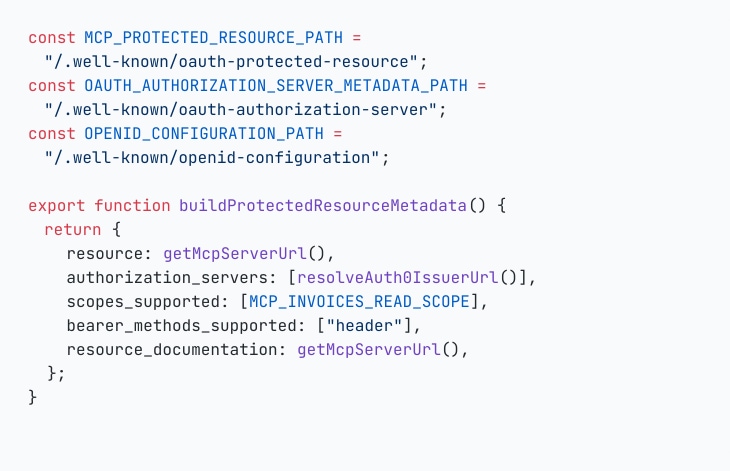
The first snippet is there because this part is actually required. Exposing /mcp is easy enough. The surrounding metadata is what tells MCP clients which resource they are talking to, which authorization server to use, and which scopes they can ask for. If you are using a good MCP builder skill, most of this shape can be scaffolded for you instead of being assembled by hand. The same goes for Auth0-focused auth skills or templates: they can save time on the security wiring, but you still need to understand what these endpoints are publishing and why clients depend on them.
The nicest part of this setup was the development loop. Local iteration was still much faster than doing the full CI/CD circle every time, and localhost is a well-understood domain for browsers and identity providers like Auth0, so some CORS and SSL pain simply stays lower during development. Deno Deploy made the next step easy: I could keep localhost and production databases separate without installing a local database stack, get the feature working locally, and then verify the deployed version quickly once I wanted to test the real hosted flow.
MCP tools felt a lot like endpoints. The testing loop was the real difference.
Once the server was reachable, the mental model got simpler. MCP tools felt a lot like endpoints. You still define a surface, inputs, outputs, and behavior. The real difference was in testing and in the extra app wiring around UI resources.
I ended up with two tools. One stayed deliberately boring and returned raw structured invoice rows for filtering, pagination, and explicit data use cases. The other opened the user-facing invoice overview app. That split kept things clean. One tool was for data. The other was for the actual app surface.
That is also where Inspector earns its keep. It is the fastest way I found to answer the first batch of practical questions: are the tools registered, does the schema look sane, is the app resource visible, does the host-facing shape look coherent, and can the whole thing render without drama?
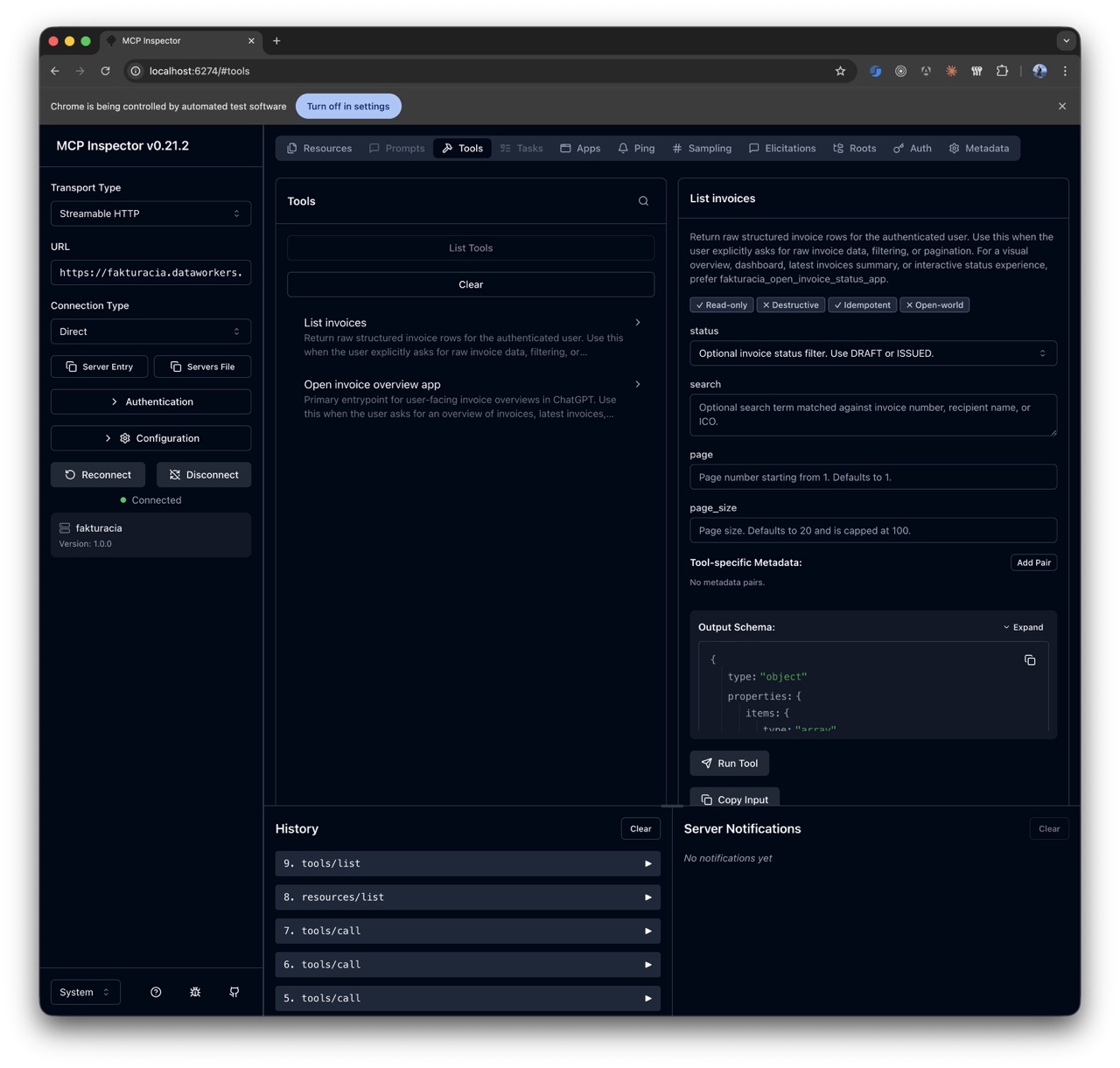
The reusable part on the app side is the moment where the tool points the host at a UI resource and returns the metadata the host expects. This is another place where the latest docs matter. To get the app rendering properly in ChatGPT, I had to follow the OpenAI docs on MCP Apps UI metadata and also add some OpenAI-specific metadata on top, even though the overall shape still follows the MCP standard. I would expect Claude or Gemini to have their own host-specific details in the same area, but I did not test those.
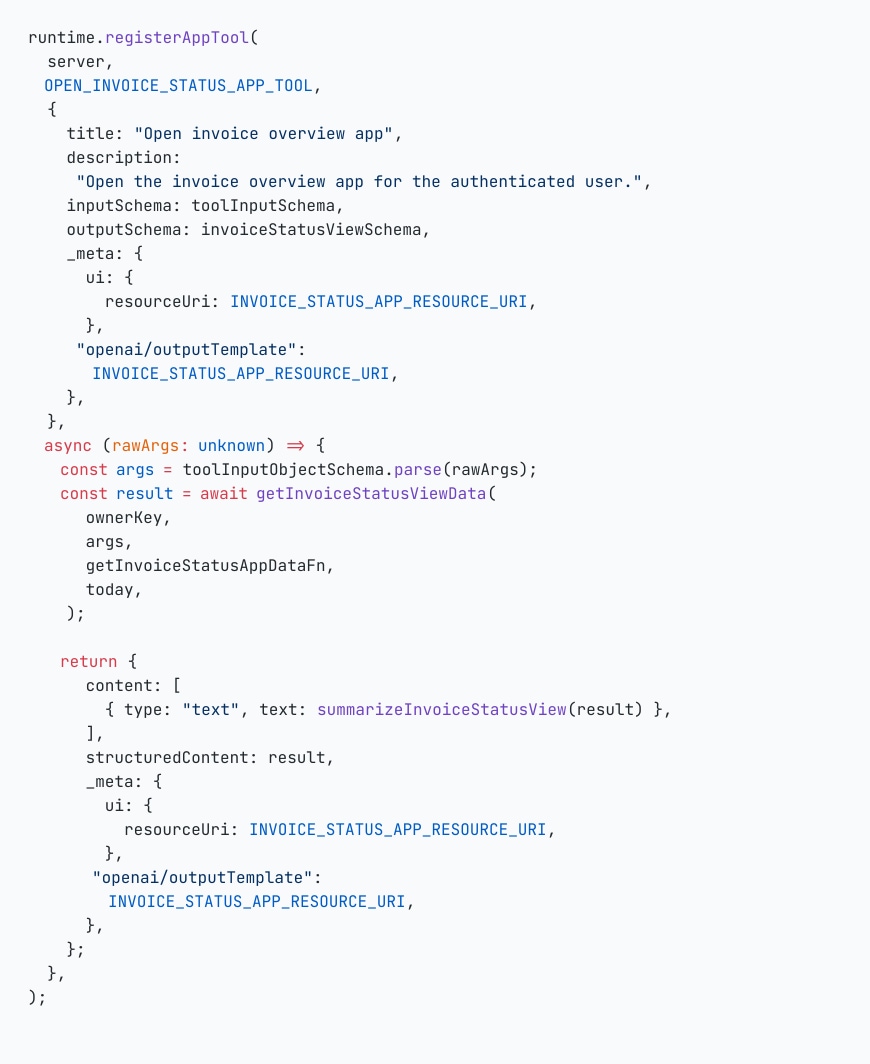
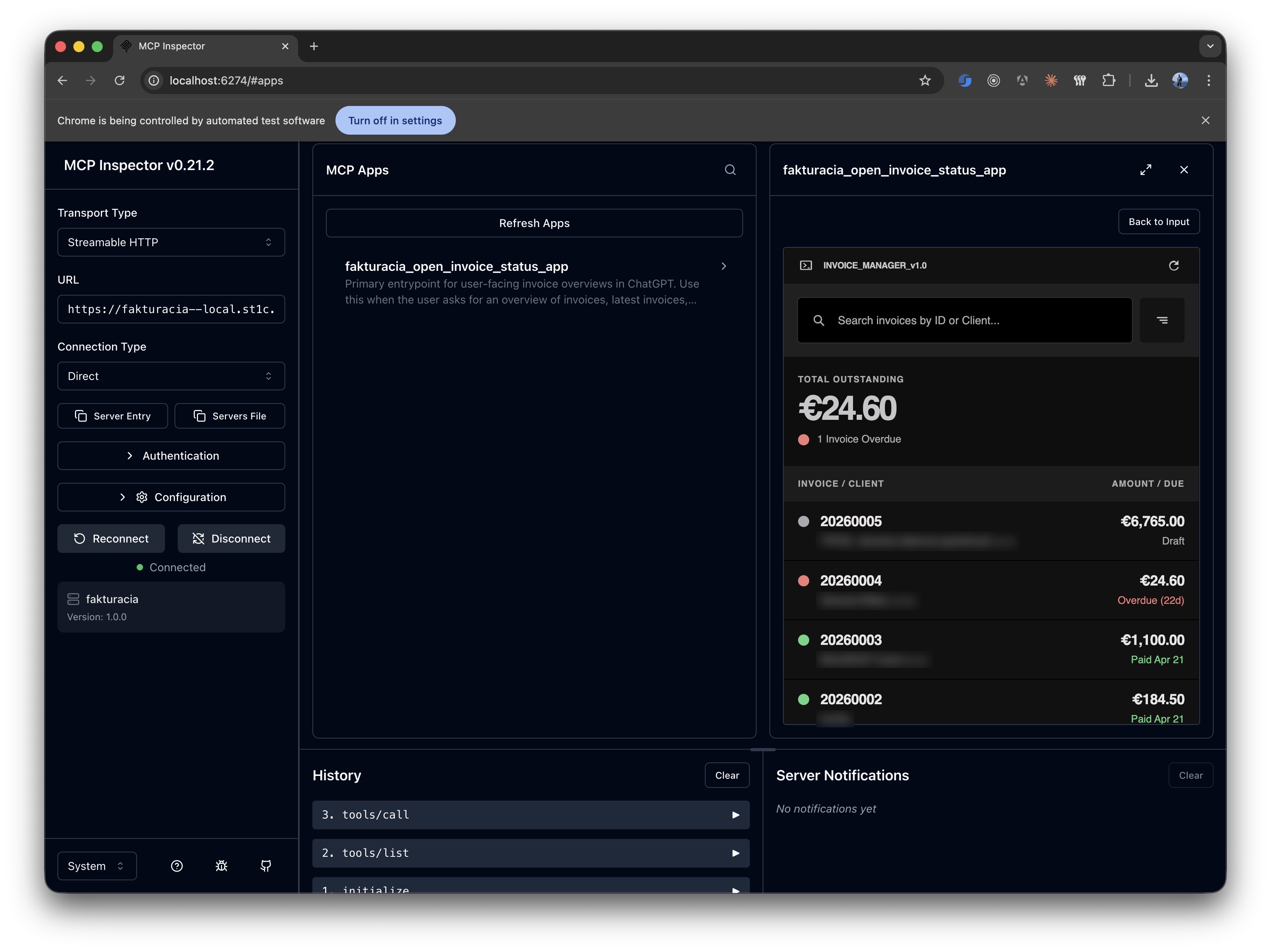
Once that shape was in place, Inspector could also render the app view itself, which made it much easier to check whether the resource wiring was real or only theoretically correct.
Start with one small widget and build from there
Version one of the app surface was intentionally small: read-only invoice overview, a compact status summary, and simple browsing of recent invoices. That was the right call. Start with something small, prove that the handoff from tool to UI is useful, and build on top of that later.
Keeping that first widget small paid off twice. The host integration was easier to reason about, and failures were easier to isolate. When something broke, I was debugging one narrow app surface instead of a half-rebuilt product jammed into a chat window.
Auth0 saved me time, but the alignment still had to be exact
Auth0 was useful here. For a small personal project, the free tier was enough, and it gave me a lot of the OAuth and OpenID plumbing I would not have wanted to rebuild myself. You can use something else, of course, but for this case Auth0 saved time. If I had tried to get the same result out of Google Identity Provider, I would have signed up for much more custom work.
The useful Auth0 reference here was their Auth for MCP documentation, especially the part about securing MCP servers and the surrounding discovery and registration flow. The hard part for me was not the code. Codex handled most of that. The hard part was getting the Auth0 tenant set up correctly: which applications had to exist, which API had to be created, which identifier had to match MCP_SERVER_URL, and which scopes and settings had to line up with the MCP metadata.
That is where the setup mattered: Chrome DevTools MCP had to be installed in Codex or Claude, and remote debugging had to be enabled in Chrome. Once that was in place, I could keep the Auth0 admin open in a real logged-in browser and let Codex inspect the tenant as it actually was, then guide me through the setup step by step instead of guessing from screenshots or from my descriptions. That was a much better workflow than bouncing between docs, browser tabs, and half-remembered Auth0 settings on my own.
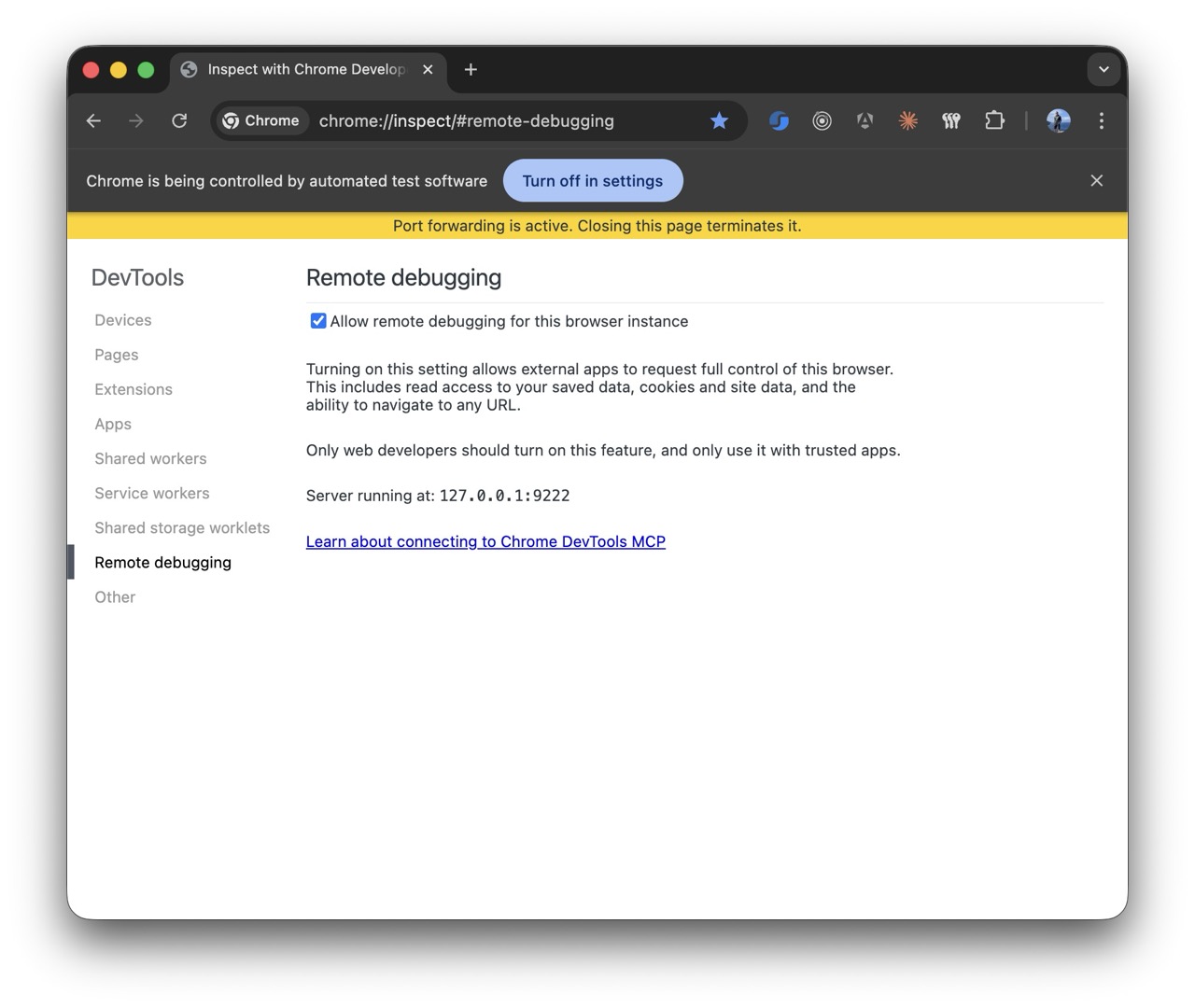
With that browser session attached, the useful prompt was not "implement Auth0." It was much more specific and operational:
Use Chrome DevTools MCP with the Auth0 admin tab I already have open.

Guide me through the exact Auth0 setup needed for this MCP server.

I need you to inspect the current tenant and tell me:
- which Applications / clients I need to create
- which API I need to create and what Identifier it should use
- which grant types, callbacks, and auth settings matter here
- which scopes and values have to match MCP_SERVER_URL and the MCP metadata

Do not start by rewriting code.
First walk me through the Auth0 admin configuration step by step and verify each value against the MCP auth docs.
Then update the repo code only after the tenant setup is clear.
This was closer to the real workflow: Codex looking at the open Auth0 admin through Chrome DevTools and walking the setup step by step.
JWT verification itself was straightforward. The annoying part was alignment. MCP_SERVER_URL had to match the Auth0 API identifier. The issuer had to stay exact, including the trailing slash Auth0 publishes in discovery. The scope had to be consistent. The MCP-facing metadata had to be present on the app side as well, because MCP clients do not magically infer that from your identity provider.
That is why those .well-known endpoints belonged in the article and in the implementation. They sit on the MCP API surface just as much as the transport route.
Use Inspector for protocol questions. Use Chrome DevTools for the real app.
Inspector was excellent for checking the protocol side early. It answered the boring but important questions quickly: can I connect, can I authenticate, are the tools visible, is the app resource there, does the app render at all?
Inspector and Chrome DevTools ended up covering two different jobs. Inspector was where I checked the MCP surface itself. Chrome DevTools was where I debugged the actual browser behavior around the app: logged-in flows, cookies, auth redirects, iframe behavior, CSP issues, and the browser quirks that are painful to reproduce in stripped-down automation browsers.
The setup I would recommend now is straightforward: open your normal Chrome profile, enable remote debugging, and connect that browser to Codex or Claude through the Chrome DevTools MCP server. Then let the agent work against the same logged-in state a real testing user would have. That closed the loop much faster than trying to keep re-authenticating inside built-in agent browsers.
I did run into one caveat worth stating plainly: the Chrome DevTools MCP setup only stayed reliably calm for me when there was one Chrome window and one user profile loaded. Multiple tabs in that window were fine. Multiple windows or multiple profiles were where the session started getting flaky.
If I were doing this again, the one process change I would make immediately is wiring Chrome DevTools into the coding loop earlier.
Codex only got good once the repo had real boundaries
Codex only started pulling its weight once the repository stopped being vague. I had to tell it, very explicitly, that this was Deno and Fresh, that the MCP surface lived inside the existing app, that Auth0 was already the auth layer, that the first widget was intentionally small, and that tests, build, and browser verification were part of done.
This is where skills, plugins, and repo rules earn their keep. For Deno and Fresh work I leaned on Deno-oriented guidance so the model would stop defaulting to Node-shaped answers. More generally, proper skills are one of the best ways to make coding agents reliable on real stacks. They narrow the solution space before the model starts improvising. That matters a lot around framework boundaries, authentication, and authorization.
Even then, the first implementation often sucked. That is normal. Somewhere around a third to half of first attempts in this project still needed correction, tighter constraints, or outright replacement. Senior judgment matters a lot here because you need to recognize when the agent produced something that looks plausible but is built on the wrong assumption. Auth and authorization work are especially unforgiving on that point.
Once the boundaries were clear, Codex was good at the repetitive work around routes, schemas, metadata plumbing, helper cleanup, tests, and the small integration fixes that would otherwise chew through focused engineering time. Plan mode helped. Tests helped. CI helped. Closing the loop with actual verification helped even more.
Deno and Fresh fit this work unusually well
Deno and Fresh turned out to be a good stack for this kind of project. Deno keeps the web-facing TypeScript work direct: fetch, Request, Response, JWT verification, remote metadata calls, and small service modules all feel native there. Fresh is a good fit for MCP Apps because the server-rendered shape is already close to what these app surfaces want. The MCP layer could live inside the existing app without turning into an architectural detour.
That also made it easier to keep the MCP server inside the existing product instead of breaking it into a separate service too early. The routes lived where the rest of the app lived. The domain logic stayed reusable. The whole thing felt lightweight instead of over-architected.
Deno Deploy also deserves a mention because it made the delivery loop faster. Quick CI/CD and fast deployments are unusually helpful in MCP work, since some behavior only really settles once you test the outcome in the actual place where the host connects. Being able to push a change and then try it quickly in ChatGPT or Inspector is a much better loop than theorizing locally for half a day.
Closing
After building one for real, my view is simple. MCP Apps are a practical bridge between AI chat interfaces and software that already exists. The hard parts were the usual ones: metadata, OAuth, authorization, browser behavior, testing, and repo discipline.
That is also why I think they matter. Once the pieces line up, the chat stops circling around your product and starts opening useful product surfaces where the user asked for them. That is far more interesting than another clever text answer.